import os

_ = os.environ.pop(
    "CONNECTION_STR", None
)  # to make sure no environment variable is used
Query and search data
BioKb-IPNI uses SQLAlchemy to define the database schema for storing chemical compound data from the IPNI database. The following diagram illustrates the main entities and their relationships:
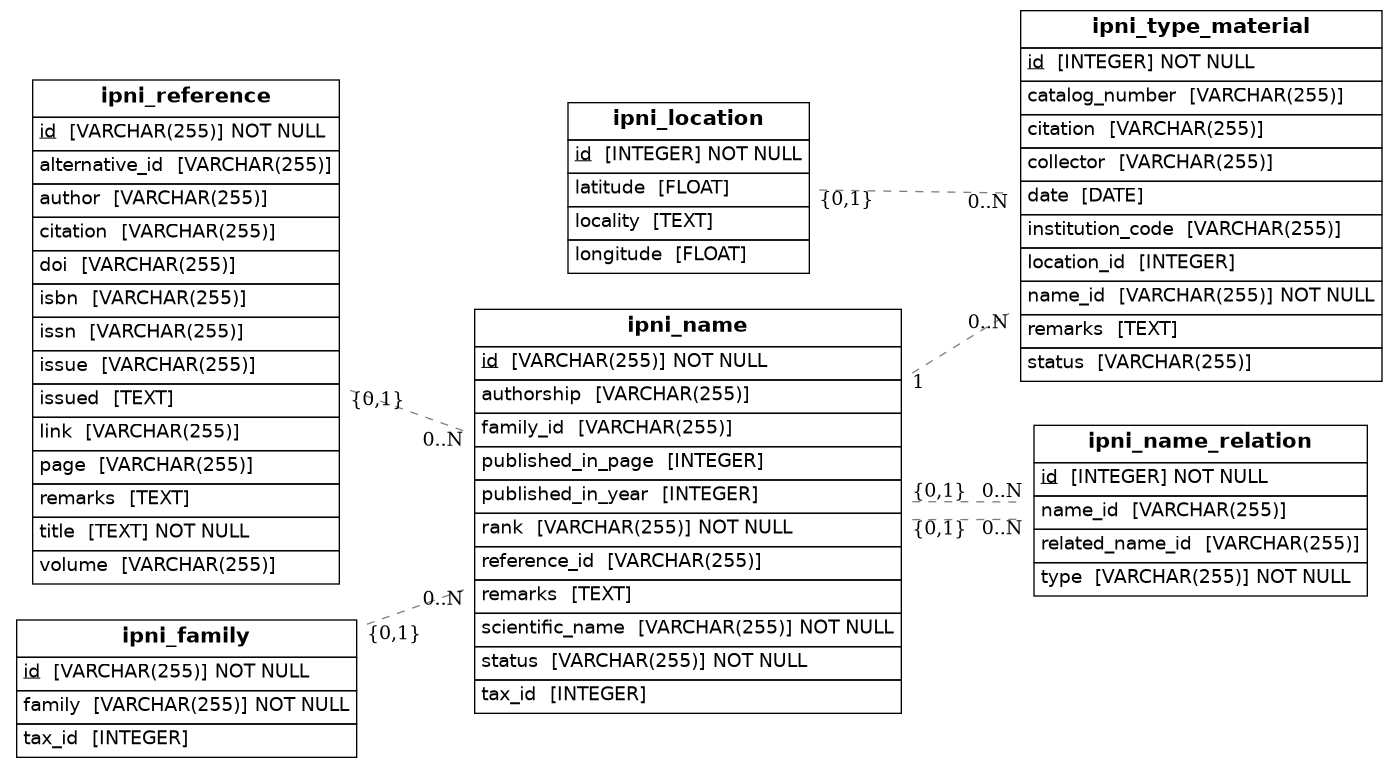

You can use SQLAlchemy's ORM capabilities to query and search the data stored in the relational database. Below are some examples of how to perform common queries using SQLAlchemy.
Overview
You can query the database using SQLAlchemy.
First import the data using the import_data function. You can skip this, if you have already done so. This will download the IPNI data files, parse them, and populate the database. Depending on your system and internet connection, this may take some time.
from biokb_ipni import import_data

import_data()
Example Query
The next cell builds and executes a SQLAlchemy query to fetch up all names for plants start with the name Achillea millefolium
from biokb_ipni import models
from biokb_ipni import get_session
import pandas as pd

with get_session() as session:
    achielleas = (
        session.query(models.Name)
        .filter(models.Name.scientific_name.like("Achillea millefolium%"))
        .limit(3)
    )
    for name in achielleas:
        print(f"Name: {name.scientific_name}")
        print(f"Family: {name.family.family}")
        print(f"Rank: {name.rank}")
        print("--")
Name: Achillea millefolium var. borealis
Family: Asteraceae
Rank: var.
--
Name: Achillea millefolium subsp. borealis
Family: Asteraceae
Rank: subsp.
--
Name: Achillea millefolium f. rubicunda
Family: Asteraceae
Rank: f.
--